I've examined quite a few gp2x type games lately and I've noticed a trend. They tend to take games that you traditionally think of as silent and add sound, usually via some rather large .wav files played through the somewhat bloated SDL_mixer library. I swear they've probably got a chess game with a soundtrack. Now, that might be nice on the zipit too, but it won't ever fit on the jffs.
However, I'd really like to fit a few games on there, just for emergency entertainment purposes, so I searched around for some card and puzzle games for the console. I happen to enjoy sokoban style games so I built some of those. Other folks like solitaire, or minesweeper. I've got a few of them built now too. I just need to spend some more time with them for - err - "testing" purposes. Yeah, that's it.
Here's a teaser shot of my zipitized port of consolitaire from a recent "test run".
I'd like to pretty up freecell with a similar look, if possible. Eventually I should have a nice bundle of tiny games for the goodie bag, real soon now...
This nc-fighter game almost fits, but it moves too fast for me.
XorCurses actually fits, but only with the 4x6 font. Better get a microscope if you plan on reading the help screen. It's quite playable though, once you learn the basics. And since it's a puzzle game it's a good one for me.
Yeah, this game is fun. It actually got me motivated to get a better 4x6 font in order to read the help text. So I grabbed the Tom Thumb bdf font and converted it to a psf console font, adding the ncurses line drawing characters while I was at it. It came fully stocked with a set of tiny unreadable latin15 characters, so that was a nice bonus.
It gives me a migraine, but I can read it if I have to. Hmm, perhaps this could also be used for those bloated finch config screens.
Meanwhile I managed to fit the Enigma puzzle game into the standard iz2s font. So far I've only managed to get about 20 moves into the game before I realize I'm stuck. Either this game is really, really hard, or I must be getting senile faster than I thought.
The start up menu screen needed some adjustments to squeeze it onto the zipit, but it works.
I also built the Chroma puzzle game which supposedly supports Enigma and Xor levels as well.
And finally, to remind myself that SDL based games can also be small and silent, I built the embedded version of vectoroids.
It's only about 20K altogether, including the redspot image file.
For reference, here are some handy sites with loads of links to console apps.
And now I really need to stop "testing" and get to work, packing all this up for the goodie bag...
But first I should mention the recent bugfix for fceu. It was pointed out that the previous build did not allow saving the Battery backed RAM state, which made some games such as Zelda much more difficult than intended. This build fixes that. Here's an openwrt ipk, just in case there's problems with the nightly builds. fceu r67-1 pxa
I have a new IZ2S executable too. Get the package from the goodie bag (if you don't already have it) and replace the fceu executable with this one if you want to use the save feature.
The original design of the zipit envisioned it as a communications toy for kids. However, when I first saw it I pictured it as more of a learning toy, at least for me. It's got all the basics for software development built into a teensy toy form factor. And over the past few years I've learned quite a bit, porting various pieces of software to fit on the slow processor and gizmo shape of the zipit. In fact it's been almost 2 years now since I attempted to relearn some shell scripting techniques that I'd nearly forgotten with the passage of time. I always thought that stuff might come in handy some day, possibly even at work. And sure enough, it's finally paid off.
At work I'm occasionally called to help support the field engineers by phone as they deploy the software parts of the systems we build. Some of these are built on TinyCore linux and installed in a little black box with no local user interface. This can be challenging when someone wants to transfer files to and from the devices with say a usb stick at the site. Now, TinyCore comes with a really nice simple gui for identifying and mounting usb sticks, but if you don't happen to have a monitor or mouse you wind up trying to do it all via an ssh window from a laptop nearby. Just try talking someone over the phone through the linux commands for identifying, and mounting a usb stick on the command line. Let me tell you, it's a challenge.
So to make my life somewhat easier, I decided to devote some of my spare time to make a shell script that emulates the TinyCore disk mounter tool. You can see here the original FLTK gui tool and the scripty tool below it running in an xterm.
Not too bad, eh? Now what, you say, does this have to do with the zipit? Well, it turns out TinyCore runs on a busybox ash shell, just like the zipit. And it doesn't come with the dialog program so I had to build the scripty disk mounter out of /bin/sh, sed, and grep (with a sprinkling of ANSI escape codes) just like I did with the zipit almost 2 years ago. I suppose it might even be handy on the zipit if the homemade usb adapters were ever to become commonplace.
Here's the code. The mnttool.sh script uses 3 helper scripts that are also included. Two of them come from TinyCore and are also used by the GUI tool. The cfajfuncs helper script comes from http://cfaj.freeshell.org (I bought and recommended his book previously) and is slightly modified to work with the variations of the echo and read commands in the TinyCore busybox shell.
In the midst of my last post I noticed that dronz had rearranged his blog and posted some screenshots of his latest french version of the iz2jffs. They look quite pretty with that shiny blue background. I'm somewhat jealous, gotta get me some of that. I wonder what happened to the older blog posts though. They don't seem to be available via his archives link. I know I referenced some of them from this blog way back when I was working on the keyboard, so now I have to go back and review all my old posts for dead links. Maintaining things on the internet can be quite a drag sometimes.
And speaking of change, I also saw the gmenu2x tabs were reworked, perhaps to sync up better with the gmenu2x from slugs openwrt jffs. It looks like the utilities and terminal tabs have been dropped in favor of games and programming. While I'm not sure programming requires it's own tab, I do have to admit I've been somewhat delinquent with the games. After all, the zipit shares quite a bit in the form-factor department with other portable game systems. So it should naturally be fully stocked with games.
But what've we got so far? Doom, nethack, some rockbox games, and an fceu port without sound. I'm sure there are some others, but nowhere near enough to fill up the games tab. So I got busy, prowling through the sdl game list links, searching for anything appealing that might scale down to the zipit.
The first thing I spotted was opentyrian. That seemed to be available on just about everything. I grabbed the latest sources and built it with the dingux settings but it was painfully slow. Huh? Turns out the current sound code is full of floating point ops used to emulate the ancient opl sound hardware. Now why would they do that? This was originally a DOS game. So I dug back in time and found an earlier port for the gp2x that was apparently done before someone went crazy with the floating point. I built 2 more versions of the executable with that source --- one with sloppy 8bit sound for speed, and one with higher quality 16 bit sound. I prefer the one with the better sound, but it runs slow when music is enabled and things are really happening in the game. So I disabled music by default, but you can turn it on if you want via the esc menu.
Next I tried mozzwald's port of ohboy from openwrt. I was hoping it'd have better keyboard support than the rockbox gnuboy plugin. I'm not sure why the openwrt build doesn't include the splash screen image, but I guess it isn't really required. Unfortunately, I'm still stuck on this one. The menu runs, but not the games, so I put it on the backburner for now.
I have about half a dozen prospects from the sdl game list. My reflexes are shot, so I need to find some puzzle games like sokoban for me. Slug also mentioned cards, so I'm on the lookout for a card game that doesn't require a mouse to manipulate the cards. Of course, wouldn't you know, the first thing I got working was another space shooter game, InsanerzShooter.
It works, despite the use of floats in the particle system. That actually looks like an easy fix if I decide it's needed. But for some reason the SDL_mixer lib doesn't like the oss audio driver, and the alsa driver on iz2jffs is my hacked build with extra buffering to reduce the skippies in rockbox. This means all the laser and explosion sounds arrive about a second late. Or is that the way it's supposed to be because of the speed of sound in a vacuum? Heh. I need to go way back in time and review my documentation on the SDL alsa environment variables that I added to let me tweak the hacked buffer settings.
Goodies will be posted soon.
Update:
Looks like I'm falling behind with the goodies. Oh well. Soon, I promise. I had a refreshingly challenging week at work, and I also got distracted by some other games like blockdude and several different flavors of solitaire for the zipit console and SDL. I'll get it all sorted out someday...
And here's a little note-to-self: Walrus45 reminded me --- yet again --- to see what's up with the save function in fceu. So I'll have figure out how to get past level 1 in something.
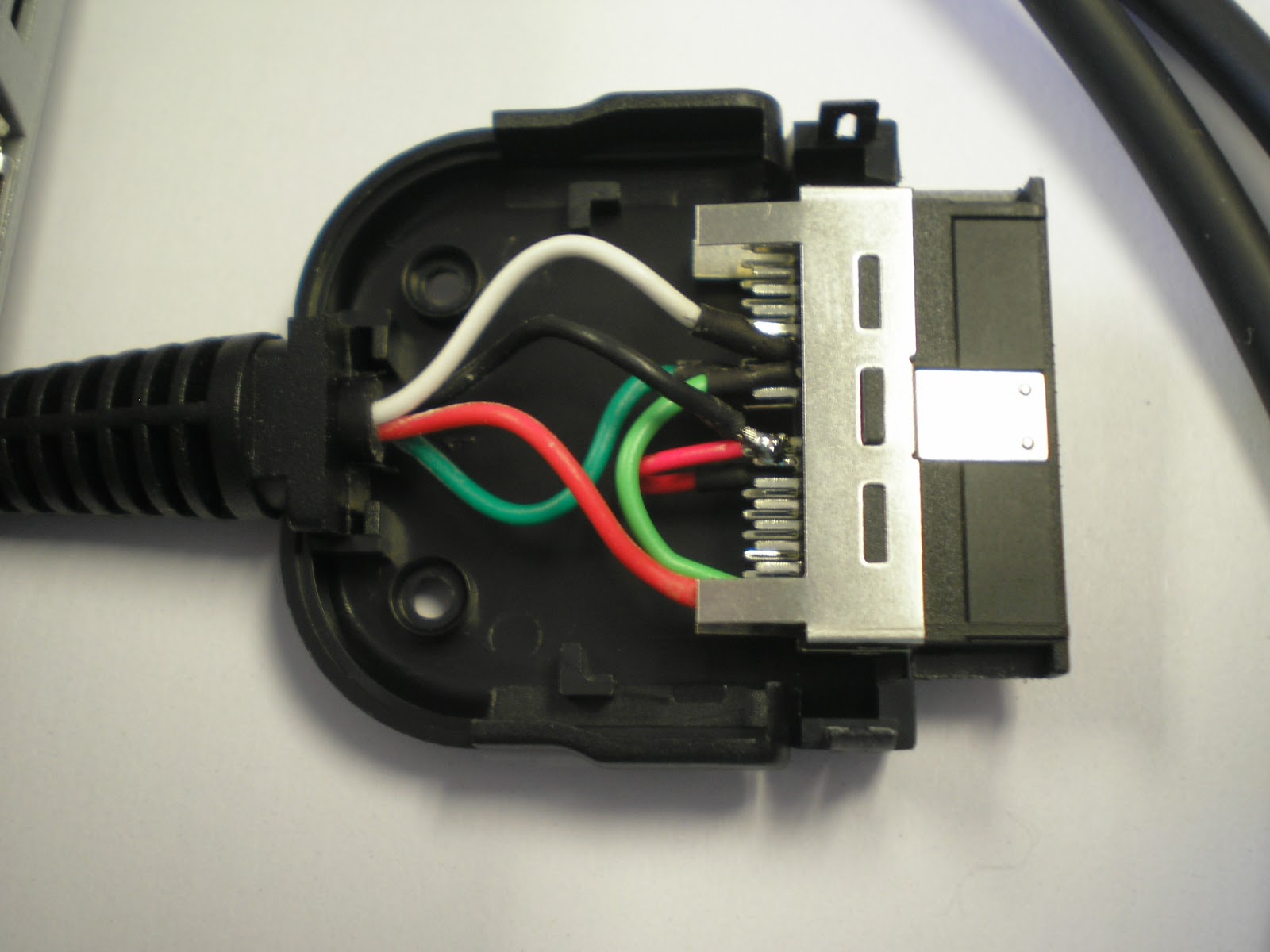
One thing I dislike about the zipit is the power adapter. The connector seems flimsy, and in fact the tiny plastic end sometimes comes off the connector and lodges inside the zipit. I happen to have one zipit in that sad state right now, unable to get a charge. This got me thinking again about the Dell Axim x50 and it's expansion cable with the zipit compatible 36 pin connector. Now I've got a reasonable excuse to make a purchase and see it the Axim cable can be modified for use with the zipit, like for instance as USB charge cable. So I picked one up online and took it apart.
The connector hood is held together by two screws and some fairly weak clips so it's easy to disassemble. Here you can see the two screw holes on the left, and the 4 red, black, white, and green USB wires, (is that a standard?) along with 2 jumper wires connecting ground and power to multiple pins.
Here it is from another angle. And one more shot with the hood removed. Sorry about the sloppy photography. I might try to get some better shots.
The interesting thing about this connector is that although it looks very similar to the one from Hirose that's popular with the zipit folks, it's not the same. The top and bottom rows of pins inside the connector are physically swapped. Odd numbered pins are routed to the bottom of the Hirose connector, but are sent to the top of the Axim connector. This threw me for a loop when I tried to match up the colored wires to various online documents describing the Axim pinout.
Next up, I gotta move the wires to different pins so it can charge the zipit. Wish me luck...
Last weekend I did some traveling, and spent some quality time with the zipit at the airport and on the plane. During this time I realized that I really wanted an mp3 player integrated into gmenu2x in much the same way as the internet radio player. Rockbox and gmu have their place, but it's sorta nice having the music playing in the background on tty4, while still maintaining some control over it in gmenu2x.
The first thing I did was modify the mpg1234 script that's the heart of the radio app to handle mp3 file names with spaces. This made it possible to create an mpg123 app for gmenu2x that works pretty much the same way as the radio app. You can select a whole directory of mp3s with the space bar and view the "now playing" info without ever leaving gmenu2x. However it was still a bit of a pain switching over to tty4 if I wanted to skip a song or pause it briefly to listen to the plane departure announcements. I needed a way to send an f or a space character to the mpg123 process running on tty4 from within gmenu2x. Fortunately we have the internet and it provided the basics for this tiny sendtty program, which I used to create 4 handy new media control utility apps in gmenu2x.
The Pause and Stop buttons should also work just fine with the internet radio app. Eventually I plan on making yet another gmenu2x release with hot keys for the media control functions, as well as a w hot key for the wifi. But I haven't decided yet whether to make the minor release numbers for iz2jffs V5 go to 11, or if I'm ready to start calling it V6.
Anyhow, here's the mpg123 app, including a sendtty executable for iz2s.
I might have to rework that a bit because the shiny new french version of iz2jffs seems to have replaced the underused terminals and utilities tabs with some more interesting stuff. So the media buttons will have to go in settings instead. I can live with that.
Before hitting the road, I did some work on the funkgold tracker program, fixing bugs and making it fit better on the the tiny zipit screen. Here's a zip file with an IZ2S executable and modified sources.
If you compare this screenshot to the one in the previous blog post you'll get some idea of what I did to make it workable with the default iz2s console font size. For example, on this screen the Length field is hidden until you move the cursor off the Sample Name field. Then it appears and obscures the right half of the sample name. Some of the other fields use shorter abbreviations, so the whole thing just barely fits.
This time I really and truly wanted to get a links browser build running on the zipit with ttf fonts instead of the fuzzy built-in fonts. Unfortunately a nasty segfault halted my forward progress like a brick wall. I swear I'm almost there. Really. But apparently not in the mood for a serious debugging effort.
Before I hit the bricks I made a little bit of progress. I discovered links apparently has 33 language translations for the menus baked right into the executable, just like the font system. I removed all but English and French for a 500K RAM savings at runtime and a 100K savings on the jffs. Not too shabby. I also devised a simple way of loading one or more of the excised translations at runtime from a shared lib using dlopen, but didn't code it up yet,
Anyhow, this put my free space on the jffs right up around a megabyte. Sweet! So I pressed ahead and cut ties with the internal font, roughed in a ttf system based on the plan9 varfont patch, and found myself with a "tiny" 500K upxed links executable that promptly segfaulted. Aargh! So close. I bet if I swapped out the openssl bloat for the tiny matrix ssl library I could get it down around 300K. Of course, it doesn't work right now. There's probably some residual piece of the old font system poking at random memory through a bad pointer that I forgot to prune out. I'll get it, but i need to step away for a moment.
Maybe some relaxing music might get me back into the swing of things? Well, actually this has been bugging me since the sound system in my fceu build didn't quite work. I decided to try and port the SDL Drum Toy to get a better idea of how game sound is accomplished. So I shrunk up the interface from 640x480 to 320x240 for the zipit and gave it a spin.
Heh. It sounded even crappier than the Super Mario sound running in fceu on the zipit. But I stuck with it and learned a few things. Notably, the first 4 sounds in all of the sample music tracks appear to be loaded from .wav files, and work just fine. The other 12 sounds are typically synthesized at runtime to create an octave of notes, or a few chords. These FM synthesized notes are generated on the fly at runtime, but about 10 times too slowly for actual use due to the lack of a floating point unit in the zipit processor. I think this is basically the problem with the fceu sound code. It can't create sounds fast enough to use them in a timely manner on the zipit hardware.
When I commented out the DrumToy FM synth code, the tracks played at full speed, albeit with only the 4 digital drum sounds. So I thought maybe if I converted the FM synthesized voices to digital samples on startup then I could play the full musical track. I allocated a generous 2 seconds worth of samples to each synth voice and suddenly it was taking 3 minutes to bring up the main screen. That's not so good. I also botched the formula because the sampled FM synth notes were pure noise. But at least the tracks were now playing at full speed. So instead of synthesizing I borrowed the samples from the NDS bliptracker and used them to replace six of the synthesized voices in the demo1 track. It sounded weird, but it worked. It looks like you can probably make full use of all 16 voices in the DrumToy if you can find 12 more decent mono .wav files.
This music stuff is kinda fun so I may tinker with it some more, until I feel like taking on the segfault. There must be some simple integer only synth code out there somewhere, right? Didn't we have different notes on the PC speaker way back when DOS ran off a flippy floppy? I may even have a 5 inch floppy in the attic with that sort of code on it. Too bad I got nothing to read it.
I see there's quite a bit of sample code here. And this has some fast integer sine functions, with arm assembler code! Just what the doctor ordered. The DrumToy FM synth boils down to a few floating point multiplies and two sine calls per sample. If I can just convert it all to fixed point, that function might just do the trick.
Yeah, so that turned out to be a relatively easy build for the zipit. It takes almost 30 seconds to load, but seems to work ok. However it requires the z2mouse which makes it somewhat cumbersome to use. I might take a look at the keybinding code someday to make it easier to control. Although I'm not sure how much I can do. It seems to have a function for every single key on a full PC keyboard. So any sort of "fix" would just be a trade off for a slightly more usable set of keys.
Since I don't particularly like the dpad "mouse", I thought it might be a good idea to try and dig up something mouseless. I ran a search for ncurses trackers, but most of that stuff appeared to be rather old. I built the ancient funktrackerGOLD and managed to play it's example songs, but it reqires an 80 character wide terminal, which forced me to load this nearly unreadable Atari font.
It also sounds like the music is being played underwater. Is that really the way 8bits used to sound? No, it's not. Turns out the mixer code in funktracker uses doubles. The individual instruments actually sound just fine when played manually via the the single octave on the z row of the keyboard. I did some experiments reshaping the display for a bigger font, and fixed some nasty stack overrun bugs caused by string overflows. I'd say this has promise, if I can convert the mixer code to integers.
Update:
I've spent some time in the DrumToy code and made a little bit of progress.The integer sine functions seem to work ok. It can now synthesize the 12 FM notes on the fly, which is pretty cool. The small errors introduced by the integer math may be changing the tone of the notes somewhat, but it's hard to tell because I've found a bigger problem. The tempo isn't working right on the zipit. At some point I noticed the 4 wav sounds seemed to stutter and hang around too long, which got me looking at the code for maintaining the tempo. It's starting to look like the DrumToy was programmed with a fairly powerful PC in mind.
I'm not sure exactly where the tempo problem originates, but I suspect there's too much wasteful math happening in some of the inner code loops where it should just be moving data out to the audio device. I did some experiments with reducing the graphics overhead and that quickened the tempo quite a bit, but still not quite up to full speed. I also did an experiment with no notes playing, not even the wav notes, and it still failed to keep up with the expected 120 beats per minute. That should never happen. So I've gotta fix this before I go back and attempt to smooth out the FM sounds by tweaking the location of the decimal point in the integer math.
Update 2:
Heh. Apparently there was some more sneaky floating point math (that I completely missed) in the saturation_process function. I commented that out and now it runs at the correct speed. So it's back to tweaking the integer math in the FM synthesis code. Gotta find me a few more bits of precision for those low, low notes in the demo1 track.
Actually all of the integer math notes were sounding a bit flat, even to my tin ear. What's up with that? I dug up a cheap guitar tuner gizmo and verified it. They are indeed flat. Whereas the tuner says the floating point math is generating the true notes. Hmm, maybe I should go back to double precision floats for the initial frequency calculations, and save the integer math for the runtime sample generation? Or maybe the integer sine function loses precision as the number of cycles increases? I don't know, so I think I'll go back and retest it with some additional (more realistic) sample points.
Update 3:
I solved the problem with the flat notes. It was accumulating errors in the integer math, which pushed all the frequencies off by a few cycles per second. Now it sounds halfway decent, and the guitar tuner gives it the thumbs up too. It still needs lotsa work with the location of the decimal point in all of the integer multiplies. I think there are parts of the code where I'm down to a single bit of precision -- the sign bit -- but it's only supposed to be a "toy", right? So it'll have to do for now.
Here's a nice blurry video. Enjoy.
Here's some DrumToy executables for IZ2S and OpenWRT, with the integer FM synthesis source code included.
The openwrt package should have shown up in the nightly builds by now. It's in mozzwald's repo but not yet in the chainxor repo, which probably calculates "nightly" in Australian.
I'd really like to stay focused on converting the flipclock and the links browser from png to ttf fonts, but sometimes the distractions just sorta pop up outta nowhere. Way, way down on my todo list is a requirement for some sort of file manager for iz2jffs. Now I don't need it myself because I'm old and the command line was the only game in town when I started using computers. But I've seen plenty of folks struggling to find their way around when presented with a command prompt. So when I stumbled on a file manager written in C and SDL on a raspberry pi forum, I figured I had to stop and take a look. I tweaked a few lines of code to shrink up the display into something a bit more zipit sized, and ended up with this.
It still needs work to make it usable on the zipit, but it shows promise. Plus it's only about 25k after upxing so it could easily fit on the jffs. However, first I should decide if it makes more sense to add some basic file manager functions to gmenu2x instead. Based on the grey function buttons in the image above, there really isn't all that much missing from the gmenu2x base code.
So I took another look at Dingux Commander which has a more polished look, shown here browsing the iz2jffs home directory in the left panel, and the mounted filesystems on the right.
But it's C++, and at 115K it's not such a great candidate to put on the jffs. However, I thought maybe I could simply fold the code for the split panel view and the file manager functions into the gmenu2x C++ code base without increasing the bloat by all that much. And as it turns out, folding the Dingux Commander code into gmenu2x (with minimal changes to make it build) only adds about 14K to the total after upxing. So I guess I should probably provide an executable, and think about rolling another release of the jffs.
Here's a tar file with a new gmenu2x executable and that nice striped background image. To keep it simple I used the ttf font and icon images from the gmenu2x default skin instead of the ones from Dingux Commander. If you try it, you should see a shiny new File Manager icon in the applications folder, right next to the Explorer icon.
After getting the basics working I did some more work on the code to make it fit in better on the jffs. I altered a few of the key bindings and turned on blended text for a smoother, more readable look. You can see here its using the smoothed gmenu2x font and the icons from the default gmenu2x theme. Looks nice.
I also patched the Dingux Commander text file viewer to reuse the gmenu2x code that I created for viewing Latin15 text files.
Finally, I merged the Commander text input code with the gmenu2x input code to enable Latin 15 input via the zipit keyboard instead of the on screen keyboard for the mkdir and rename functions. Altogether it seemed like a fairly useful addition to the jffs, so I rolled out yet another iz2jffs5 release.
And now I can get back to the ttf stuff. I took a quick peek the plan9 links-varfont hack and it looks like 90 percent of the conversion from png font to ttf can be done by replacing 3 functions in dip.c: g_print_text(), g_text_width(), and g_char_width() with the equivalent SDL_ttf functions. I still need grep for "ifdef PLAN9" and evaluate the rest of the diffs for subtle issues, but it doesn't look too painful...