Not so long ago I mentioned that the dronz alarm clock in the jffs was nice but... even with the lid closed the LEDs on the zipit are too darn bright and keep me awake. At least they're only green and amber, and not those evil blue ones that seem to be popping up on just about everything these days. I swear the blue ones can trigger migraines and burn holes in the backs of your eyes, but that's a story for another day.
Anyhow, the LEDs have gotta go if I'm gonna get any sleep. I already had a utility for controlling the right LED, so I just dug up the GPIO numbers for the other two LEDs from the wiki, and patched it into the existing IZ2S powerbutton and lid checking MCB program. The only tricky bit was the GPIO for the middle LED defaults to an input for some strange reason, so I had to borrow some more code to set the direction register. That seems to work, so now you can softlink the new "lid" executable on the jffs (or copy it on IZ2S) to a bunch of new utilities for the left and middle LEDs. I also added commands to query the current state of each of the LEDs, so they can be saved when the clock starts up, and restored when the alarm goes off.
Here's a zip file with the new "lid" executable, the source code, a script to make all the softlinks, and another script that prints all of the current LED states. Nothing really exciting, but hey, I need my sleep.
ledctrl-iz2s.zip

Fun with software, gizmos, virtual bricks, and other geeky toys.
Sunday, July 22, 2012

Tuesday, July 17, 2012
Summer Vacation.
Wow, July is half over and I haven't posted anything for weeks. I've done a little bit behind the scenes, but every time I settle down to tackle something on my todo list the dog gets the urge to go outside and play. And somebody has to go with him. It's not so bad though...

It's actually kinda tranquil now that the bridge replacement is finally finished.

So what have I got to show for all this lack of effort? Well, not much, really. I did update a few previous posts with new qemacs executables for IZ2S, z2sid, and openwrt. I really like qemacs now that I've added the missing features. I still have to try and make a real openwrt project for it, but I'm slowly inching closer to that particular goal.
Projectgus opened up the openwrt-zipit project on github, so I've been trying to learn more about github and the openwrt build system. To do this I decided to update nupdf from a mipsel-only openwrt package to one that builds against the same (more current) mupdf shared libs as the fbpdf package. The nupdf source archive appears to be inactive, so I cloned it onto github to do the update, and then added the zipit keyboard patches. I then borrowed openwrt Makefile settings from the gmenu2x package to fetch the nupdf package via git from github instead of svn from google code. Seems to work.
Apparently the old static IZ2S nupdf package also works on openwrt if you simply unzip it into /usr/local, so maybe someday I'll try and run it on z2sid as well. I'm pretty sure it's already available on z2lite.
Oh yeah, I also finally posted the gcc/gdb package for IZ2S in this old post.

It's actually kinda tranquil now that the bridge replacement is finally finished.

So what have I got to show for all this lack of effort? Well, not much, really. I did update a few previous posts with new qemacs executables for IZ2S, z2sid, and openwrt. I really like qemacs now that I've added the missing features. I still have to try and make a real openwrt project for it, but I'm slowly inching closer to that particular goal.
Projectgus opened up the openwrt-zipit project on github, so I've been trying to learn more about github and the openwrt build system. To do this I decided to update nupdf from a mipsel-only openwrt package to one that builds against the same (more current) mupdf shared libs as the fbpdf package. The nupdf source archive appears to be inactive, so I cloned it onto github to do the update, and then added the zipit keyboard patches. I then borrowed openwrt Makefile settings from the gmenu2x package to fetch the nupdf package via git from github instead of svn from google code. Seems to work.
Apparently the old static IZ2S nupdf package also works on openwrt if you simply unzip it into /usr/local, so maybe someday I'll try and run it on z2sid as well. I'm pretty sure it's already available on z2lite.
Oh yeah, I also finally posted the gcc/gdb package for IZ2S in this old post.
Monday, June 25, 2012
A Little Less Failure This Time?
This week started out much like the last. More adventures in failure. The guys on Zipit IRC seemed to be struggling with an improperly rotated links -g running on DirectFB in openwrt. I pointed out Ray Haque's secret sauce for that problem, but failed to get it done. So I got the bright idea to try and build it myself, with SDL and all my favorite patches from the IZ2S world. Sound familiar? Yeah, and it started out exactly the same way. One failure after another.
To start with, I had an old failed rockbox for openwrt that I never quite got working right. It runs, but horribly, and eventually I lost interest and moved on. Shoulda took that as a warning. Stay away. But no, I fired up the old P3 with my openwrt setup on it and updated all the git archives following Anarsoul's instructions. At least I thought that's what I was doing. Apparently the browser still had a cached version of the instructions from last February when I was working on the rockbox build. And the cached instructions contained a typo. A dash character in one of the feed names prevented me from building the qi repositories with the links package that I wanted. For several hours! The guys on IRC were quite helpful, and we eventually worked out the problem only to discover the instructions on the internet were already fixed, and probably had been for months.

Oh well, moving on. So I started the P3 building the goodies and watched for a few minutes before... guess what? Hard disk failure! Aargh! Stupid old 80GB external drive developed a bad superblock. I sorta remembered this drive gave me trouble before so I decided to abandon it and get a newer one rather than try to fix it. Someday maybe I'll try to recover the bad rockbox build with one of the backup superblocks.
The next day I nabbed a 500GB drive from one of the kids and started over. I refetched all the openwrt archives, followed the correct instructions to setup the feeds and started the build again. Then I went to sleep, exhausted but hopeful. The build failed a few times on supertux, the kbd package, and libmpg123 so I had a few restarts to do the next day. But eventually it built everything else I'd selected. Gotta see what's up with kbd and libmpg123 since I may want them someday. But for now I'm gonna build with IGNORE_ERRORS=m to keep it going after failures.
Anyhow, the links package compiled so I just needed to apply my patch from IZ2S and rebuild. Or so I thought. I tested the patch in the directory with the links sources and it applied cleanly. Cool. However when openwrt compiles, it wants to wipe out the directory with the package sources, start fresh, and apply it's own patches. But it took a while to figure out how to remake my patch the way openwrt wants it. You need to make it run with patch -p0 so the destination directory name in the patch must match exactly with the directory name in the package tarball used by openwrt. At least I think that's the case. It's hard to see exactly what the byzantine openwrt build system is doing, even with the V=99 command line option.
I got some more hints from the IRC guys on how to reproduce the openwrt build environment so I could manually step through the patching and configuring and try and fix the broken parts. I don't think I ever completely reproduced the environment but got close enough to figure out some of the trouble spots. Apparently for openwrt you need to make a makefile for each package that runs configure to create a makefile for the package. Hmmm. I examined the existing meta-makefile and attempted to convert the tricks used to configure directfb into tricks that would configure links for SDL. It didn't exactly work. The openwrt build process was successfully applying my patch, but failing during the configure stage because it couldn't find SDL. I tried looking at some other packages like nupdf and sdlwidgets for SDL config hints, but to no avail. As many things do, the answer crystalized in my sleep, and when I woke up I found the sdl-config program I needed in the openwrt-zipit/staging_dir/target-arm_v5te_uClibc-0.9.33_eabi/usr/bin directory. I fixed up the meta-makefile with that path. Now the configure stage managed to find SDL and moved on... only to fail writing the new makefile. Syntax error in the patched configure script! Did I already say arrgh!?
Now, the original SDL patch from the internet required me to rerun autoconf to create a shiny new configure script (and Makefile.in) with SDL options. I did that for my IZ2S build, but I have no idea how to do that in the openwrt environment. Also, different versions of autoconf tend to generate a completely different output files. And configure is over 600MB! So I'd attempted to make a small patch for the configure script that would paste in only the changes involving SDL and skip all the gratuitous changes caused by the different version of autoconf. That got me all the way to the syntax error. I took another look at my patch, and the modified configure script, but that's not work meant for humans. Hand editing 600MB of butt ugly machine generated script file is not my cup of tea. Even the mighty emacs with it's color syntax highlighting and electric parenthesis matching wasn't helping me deal with the horrendous tab formatting. So instead I gave up and changed the openwrt meta-makefile to replace the whole 600MB configure script with the one I'd regenerated earlier with a different autoconf on a different PC. Oh well. It's kludgy, but it works.
Not Fail! Yeah!
The new openwrt Makefile, patches, some zipit friendly config files, and key docs are on github.
I put up the links-sdl_2.3pre1_pxa.ipk package for openwrt zipits, with config files and a kbd cheatsheet.
Here's my wrt-env.sh script (modified from slugs).
Update: Anarsoul added PKG_FIXUP:=autoreconf to the Makefile to auto-magically regenerate the correct configure script as part of the openwrt build process. And projectgus pulled it all into the master github project, so you should be able to get the links package from the usual place. Cool!
Meanwhile, here's a qemacs executable for openwrt. I still need to learn how make it into a real openwrt-zipit package...
To start with, I had an old failed rockbox for openwrt that I never quite got working right. It runs, but horribly, and eventually I lost interest and moved on. Shoulda took that as a warning. Stay away. But no, I fired up the old P3 with my openwrt setup on it and updated all the git archives following Anarsoul's instructions. At least I thought that's what I was doing. Apparently the browser still had a cached version of the instructions from last February when I was working on the rockbox build. And the cached instructions contained a typo. A dash character in one of the feed names prevented me from building the qi repositories with the links package that I wanted. For several hours! The guys on IRC were quite helpful, and we eventually worked out the problem only to discover the instructions on the internet were already fixed, and probably had been for months.

See. There's the typo, right there. Can you spot the difference?
Oh well, moving on. So I started the P3 building the goodies and watched for a few minutes before... guess what? Hard disk failure! Aargh! Stupid old 80GB external drive developed a bad superblock. I sorta remembered this drive gave me trouble before so I decided to abandon it and get a newer one rather than try to fix it. Someday maybe I'll try to recover the bad rockbox build with one of the backup superblocks.
The next day I nabbed a 500GB drive from one of the kids and started over. I refetched all the openwrt archives, followed the correct instructions to setup the feeds and started the build again. Then I went to sleep, exhausted but hopeful. The build failed a few times on supertux, the kbd package, and libmpg123 so I had a few restarts to do the next day. But eventually it built everything else I'd selected. Gotta see what's up with kbd and libmpg123 since I may want them someday. But for now I'm gonna build with IGNORE_ERRORS=m to keep it going after failures.
Anyhow, the links package compiled so I just needed to apply my patch from IZ2S and rebuild. Or so I thought. I tested the patch in the directory with the links sources and it applied cleanly. Cool. However when openwrt compiles, it wants to wipe out the directory with the package sources, start fresh, and apply it's own patches. But it took a while to figure out how to remake my patch the way openwrt wants it. You need to make it run with patch -p0 so the destination directory name in the patch must match exactly with the directory name in the package tarball used by openwrt. At least I think that's the case. It's hard to see exactly what the byzantine openwrt build system is doing, even with the V=99 command line option.
I got some more hints from the IRC guys on how to reproduce the openwrt build environment so I could manually step through the patching and configuring and try and fix the broken parts. I don't think I ever completely reproduced the environment but got close enough to figure out some of the trouble spots. Apparently for openwrt you need to make a makefile for each package that runs configure to create a makefile for the package. Hmmm. I examined the existing meta-makefile and attempted to convert the tricks used to configure directfb into tricks that would configure links for SDL. It didn't exactly work. The openwrt build process was successfully applying my patch, but failing during the configure stage because it couldn't find SDL. I tried looking at some other packages like nupdf and sdlwidgets for SDL config hints, but to no avail. As many things do, the answer crystalized in my sleep, and when I woke up I found the sdl-config program I needed in the openwrt-zipit/staging_dir/target-arm_v5te_uClibc-0.9.33_eabi/usr/bin directory. I fixed up the meta-makefile with that path. Now the configure stage managed to find SDL and moved on... only to fail writing the new makefile. Syntax error in the patched configure script! Did I already say arrgh!?
Now, the original SDL patch from the internet required me to rerun autoconf to create a shiny new configure script (and Makefile.in) with SDL options. I did that for my IZ2S build, but I have no idea how to do that in the openwrt environment. Also, different versions of autoconf tend to generate a completely different output files. And configure is over 600MB! So I'd attempted to make a small patch for the configure script that would paste in only the changes involving SDL and skip all the gratuitous changes caused by the different version of autoconf. That got me all the way to the syntax error. I took another look at my patch, and the modified configure script, but that's not work meant for humans. Hand editing 600MB of butt ugly machine generated script file is not my cup of tea. Even the mighty emacs with it's color syntax highlighting and electric parenthesis matching wasn't helping me deal with the horrendous tab formatting. So instead I gave up and changed the openwrt meta-makefile to replace the whole 600MB configure script with the one I'd regenerated earlier with a different autoconf on a different PC. Oh well. It's kludgy, but it works.
Not Fail! Yeah!
The new openwrt Makefile, patches, some zipit friendly config files, and key docs are on github.
I put up the links-sdl_2.3pre1_pxa.ipk package for openwrt zipits, with config files and a kbd cheatsheet.
Here's my wrt-env.sh script (modified from slugs).
Update: Anarsoul added PKG_FIXUP:=autoreconf to the Makefile to auto-magically regenerate the correct configure script as part of the openwrt build process. And projectgus pulled it all into the master github project, so you should be able to get the links package from the usual place. Cool!
Meanwhile, here's a qemacs executable for openwrt. I still need to learn how make it into a real openwrt-zipit package...
Thursday, June 21, 2012
Adventures in Failure
A few days ago I mentioned my desire to try compiling right on the Zipit. It ought to be possible. It seems like just yesterday I had Linux with X Windows, emacs, gcc and all sorts of goodies running just fine on a junky Cyrix "486" CPU with only 16 MB of RAM. What happened?
Anyhow, just as I was lamenting my failure to debug Bunjalloo in IZ2S the subject of rockbox on z2sid came up once again on the zipit IRC channel. Ah Ha! That's been on my todo list for quite a while now. I knew z2sid came with a working gcc right from the get go. I could start with that project and work my way back to the IZ2S compiler. To make it easier for me I tarred up my pre-patched rockbox 3.9 sources instead of updating the zipit patch to the current release version. Gotta do that someday...
I dumped the sources on a 2GB z2sid SD card I had lying around in my collection and booted it up in my one working uboot zipit. I started up the rockbox configure script, picked the zipit target, and failed because it couldn't find the SDL dev package. Ok. That makes sense. I should be able to get that with apt-get install libsdl-dev. Unfortunately that took a lot longer than I wanted because I forgot you needed to be root to use ewok or wifi-config to get connected. Also the wifi-config scripts all need to be edited to replace eth1with wlan0 in order to work in a uboot zipit. I'm not sure why a zipit needs a user account in addition to root. Everything I want to do on it seems to need root permission, and really! Who cares if somebody hacks into my $10 toy via the free wifi at MacDonalds?
Eventually I got connected and ran apt-get update (twice for good luck) and then apt-get install libsdl-dev. This was taking a while so I set it aside to finish while I went out for some old man hockey and beer time. When I got back it was done, and successfully too! But apparently apt pulled down dependencies for just about every SDL backend out there, including Xlib! WTF! The poor SD card was full up to the limit with only a few measly megabytes leftover for me.
So for giggles I ran make on the rockbox sources and let it go overnight. As expected, it ran out of disk space and failed. Oh well. Maybe I'll try again, with a fresh install of z2sid, compiling my own lean mean SDL with only the framebuffer and salsa backends. That might just leave enough space on the SD card for a rockbox build. If only the zipit uboot was stable enough to work with larger SD cards. I have a bunch, but no luck with anything over 2GB.
But really, I think I need to put zipit compiling on the backburner for a while. If anyone has a bigger SD card and wants to try this, I put up the rockbox sources here.
rockbox-zipit-src.tgz
You'll need to build SDL or get a libsdl-dev package. Then do this.
cd rockboxtrunk/tools
rm bmp2rb
rm convbdf
rm codepages
cd ../build-zipit
cp autoconf.h autoconf.h.save
../tools/configure
Type 205 to select the zipit target. This will configure an IZ2S build target. You don't want that because the battery monitoring code is for the older kernel. So open up the Makefile with nano or vi and remove the -DIZ2S from the EXTRA_DEFINES line. Hopefully the battery monitoring code for the z2lite kernel is good for z2sid. Also, I made the zipit config target use the SIGALTSTACK_THREADS option, but never got it to work so you have to restore the autoconf.h.save with the SDL_THREADS option instead. Then maybe it'll build.
cp autoconf.h.save autoconf.h
make
Cross your fingers. If it succeeds, strip the rockbox.bin file then:
make install.
Maybe strip the codecs in the /usr/local/lib/rockbox dirctory and borrow the /usr/local/bin/rockbox script from z2lite.
Update: I discovered I was using the z2sid version with the enormous j (junk?) file on the root directory so I deleted that and tried again. Still no luck. Turns out it was the /tmp directory running out of space. The /tmp directory has only 1MB, so maybe I'll make a /usr/tmp and export TMPDIR=/usr/tmp to see it that moves things along.
Update 2: That actually got me most of the way through the build. It appears as if only the initial tool building stage needs the extra TMPDIR space to reproduce the bmp2rb, convbdf, and codepages utilities deleted above. Subsequent rockbox builds don't need it. However I hit a snag on the assembler code. I was forced to add -mcpu=xscale to the makefile get any arm assembly instructions above armv4 to build. That got me all the way through the "make install" step. Still didn't work though. The main rockbox executable brings up the GUI and everything looks good until I pick some music to play. Then... "Codec Failure". Oh well. At least that's familiar territory. The SDL codec loading section of the rockbox source code is overly convoluted, and I've had to tweak it a bit before for earlier IZ2S and z2lite builds. I'm not looking forward to repeating that work though...
Meanwhile, since the z2sid compiler seems to work well enough, I decided to build a qemacs for z2sid to make it easier for me to edit and debug the code on the zipit.
qe-z2sid.tgz
Anyhow, just as I was lamenting my failure to debug Bunjalloo in IZ2S the subject of rockbox on z2sid came up once again on the zipit IRC channel. Ah Ha! That's been on my todo list for quite a while now. I knew z2sid came with a working gcc right from the get go. I could start with that project and work my way back to the IZ2S compiler. To make it easier for me I tarred up my pre-patched rockbox 3.9 sources instead of updating the zipit patch to the current release version. Gotta do that someday...
I dumped the sources on a 2GB z2sid SD card I had lying around in my collection and booted it up in my one working uboot zipit. I started up the rockbox configure script, picked the zipit target, and failed because it couldn't find the SDL dev package. Ok. That makes sense. I should be able to get that with apt-get install libsdl-dev. Unfortunately that took a lot longer than I wanted because I forgot you needed to be root to use ewok or wifi-config to get connected. Also the wifi-config scripts all need to be edited to replace eth1with wlan0 in order to work in a uboot zipit. I'm not sure why a zipit needs a user account in addition to root. Everything I want to do on it seems to need root permission, and really! Who cares if somebody hacks into my $10 toy via the free wifi at MacDonalds?
Eventually I got connected and ran apt-get update (twice for good luck) and then apt-get install libsdl-dev. This was taking a while so I set it aside to finish while I went out for some old man hockey and beer time. When I got back it was done, and successfully too! But apparently apt pulled down dependencies for just about every SDL backend out there, including Xlib! WTF! The poor SD card was full up to the limit with only a few measly megabytes leftover for me.
So for giggles I ran make on the rockbox sources and let it go overnight. As expected, it ran out of disk space and failed. Oh well. Maybe I'll try again, with a fresh install of z2sid, compiling my own lean mean SDL with only the framebuffer and salsa backends. That might just leave enough space on the SD card for a rockbox build. If only the zipit uboot was stable enough to work with larger SD cards. I have a bunch, but no luck with anything over 2GB.
But really, I think I need to put zipit compiling on the backburner for a while. If anyone has a bigger SD card and wants to try this, I put up the rockbox sources here.
rockbox-zipit-src.tgz
You'll need to build SDL or get a libsdl-dev package. Then do this.
cd rockboxtrunk/tools
rm bmp2rb
rm convbdf
rm codepages
cd ../build-zipit
cp autoconf.h autoconf.h.save
../tools/configure
Type 205 to select the zipit target. This will configure an IZ2S build target. You don't want that because the battery monitoring code is for the older kernel. So open up the Makefile with nano or vi and remove the -DIZ2S from the EXTRA_DEFINES line. Hopefully the battery monitoring code for the z2lite kernel is good for z2sid. Also, I made the zipit config target use the SIGALTSTACK_THREADS option, but never got it to work so you have to restore the autoconf.h.save with the SDL_THREADS option instead. Then maybe it'll build.
cp autoconf.h.save autoconf.h
make
Cross your fingers. If it succeeds, strip the rockbox.bin file then:
make install.
Maybe strip the codecs in the /usr/local/lib/rockbox dirctory and borrow the /usr/local/bin/rockbox script from z2lite.
Update: I discovered I was using the z2sid version with the enormous j (junk?) file on the root directory so I deleted that and tried again. Still no luck. Turns out it was the /tmp directory running out of space. The /tmp directory has only 1MB, so maybe I'll make a /usr/tmp and export TMPDIR=/usr/tmp to see it that moves things along.
Update 2: That actually got me most of the way through the build. It appears as if only the initial tool building stage needs the extra TMPDIR space to reproduce the bmp2rb, convbdf, and codepages utilities deleted above. Subsequent rockbox builds don't need it. However I hit a snag on the assembler code. I was forced to add -mcpu=xscale to the makefile get any arm assembly instructions above armv4 to build. That got me all the way through the "make install" step. Still didn't work though. The main rockbox executable brings up the GUI and everything looks good until I pick some music to play. Then... "Codec Failure". Oh well. At least that's familiar territory. The SDL codec loading section of the rockbox source code is overly convoluted, and I've had to tweak it a bit before for earlier IZ2S and z2lite builds. I'm not looking forward to repeating that work though...
Meanwhile, since the z2sid compiler seems to work well enough, I decided to build a qemacs for z2sid to make it easier for me to edit and debug the code on the zipit.
qe-z2sid.tgz
Saturday, June 2, 2012
Maybe You *Can* Teach an Old Dog New Tricks
The other day while floundering around on the net I noticed qemacs 0.3.2 was out, with some compiler fixes. Because of it's size and feature set (split windows and a shell) I tend to use qemacs on all sorts of embedded platforms, and on the zipit. However its got a few quirks that constantly drive me nuts. The one that really gets me is the missing repeat feature on the C-k key. It kills me that I can't use consecutive C-k keystrokes to add multiple lines into the current kill buffer. I use that all the time to cut and paste multiple lines of text between emacs windows. To make matters worse, I never managed to get alternate the C-@ and C-w (mark and cut method) to work on the zipit because of the unusual keyboard layout. So I finally decided to dig into the code and add the missing functionality. It wasn't actually all that difficult to fix. Shoulda done it years and years ago...
While I was in there I figured I might as well add the missing scroll keys too. I've been using C-z and M-z to scroll my editor windows up and down since the days of the dinosaurs, way before there were scroll wheel mice, or for that matter mice, or scroll bars even. I got hooked on those keys many years ago in school when I switched my preferred DOS editor from MINCE to Epsilon. I no longer use Epsilon (I probably still have the floppies somewhere) but I always add those key bindings to my .emacs config file. However I could never convince the ~/.qe/config file to do much of anything for me. So now I've simply patched the source and compiled them in. Yay! If I get really deep into the code, perhaps I'll try to add bourne shell syntax highlighting, which I tend to run into more than html or C syntax on the zipit, and the embedded stuff.
Another thing I noticed on the net was a github archive with the qemacs 0.3.1 sources. I decided this was my chance to finally learn how to git. I'd already established a github account and forked a few projects, but never really got around to doing anything with it. For starters, my scratchbox development VM is on debian lenny so I had to jump through a few hoops to install a current version of git. The key to that was adding a line to the /etc/apt/sources.list file pointing to the recently archived lenny backports. I found the answers at "Git on Lenny, a love story", except for the new archived location of the lenny backports:
deb http://archive.debian.org/debian-backports lenny-backports main
Then this command got me a recent version of git.
sudo aptitude -t lenny-backports install git
So now that I'd got git, I had to get git skills. For practice I forked the qemacs 0.3.1 repository on github, cloned it to the local disk on my zipit development VM, bumped the code to version 0.3.2, applied my patches, and pushed them back up to my github repo. Piece of cake.
Next I need to learn to make a new repository from scratch on github so I can track my changes to the bunjalloo code. And then I've gotta practice git branching with my IZ2S fork of slugs gmenu2x code. I'm pretty excited about that one since it appears to use a 7K png font file instead of an enormous ttf font. If I change the jffs to use slug's gmenu2x I can get rid of the ttf libs, the ttf font, and (unfortunately) dgclock will have to go too unless I rewrite it. But I'll still have two clock apps and will save at least 300K on the jffs for more interesting goodies. Here's a screenshot. The png font uses more pixels, so not as many apps fit on the screen. But the scroll bar makes it pretty obvious that there are more down below, so that's ok, I guess.

The qemacs patches are on github, but I've also included them here with an IZ2S executable.
qemacs-0.3.2-iz2s.zip
While I was in there I figured I might as well add the missing scroll keys too. I've been using C-z and M-z to scroll my editor windows up and down since the days of the dinosaurs, way before there were scroll wheel mice, or for that matter mice, or scroll bars even. I got hooked on those keys many years ago in school when I switched my preferred DOS editor from MINCE to Epsilon. I no longer use Epsilon (I probably still have the floppies somewhere) but I always add those key bindings to my .emacs config file. However I could never convince the ~/.qe/config file to do much of anything for me. So now I've simply patched the source and compiled them in. Yay! If I get really deep into the code, perhaps I'll try to add bourne shell syntax highlighting, which I tend to run into more than html or C syntax on the zipit, and the embedded stuff.
Another thing I noticed on the net was a github archive with the qemacs 0.3.1 sources. I decided this was my chance to finally learn how to git. I'd already established a github account and forked a few projects, but never really got around to doing anything with it. For starters, my scratchbox development VM is on debian lenny so I had to jump through a few hoops to install a current version of git. The key to that was adding a line to the /etc/apt/sources.list file pointing to the recently archived lenny backports. I found the answers at "Git on Lenny, a love story", except for the new archived location of the lenny backports:
deb http://archive.debian.org/debian-backports lenny-backports main
Then this command got me a recent version of git.
sudo aptitude -t lenny-backports install git
So now that I'd got git, I had to get git skills. For practice I forked the qemacs 0.3.1 repository on github, cloned it to the local disk on my zipit development VM, bumped the code to version 0.3.2, applied my patches, and pushed them back up to my github repo. Piece of cake.
Next I need to learn to make a new repository from scratch on github so I can track my changes to the bunjalloo code. And then I've gotta practice git branching with my IZ2S fork of slugs gmenu2x code. I'm pretty excited about that one since it appears to use a 7K png font file instead of an enormous ttf font. If I change the jffs to use slug's gmenu2x I can get rid of the ttf libs, the ttf font, and (unfortunately) dgclock will have to go too unless I rewrite it. But I'll still have two clock apps and will save at least 300K on the jffs for more interesting goodies. Here's a screenshot. The png font uses more pixels, so not as many apps fit on the screen. But the scroll bar makes it pretty obvious that there are more down below, so that's ok, I guess.
The qemacs patches are on github, but I've also included them here with an IZ2S executable.
qemacs-0.3.2-iz2s.zip
Tuesday, May 29, 2012
Memorial Day
I really like the English version of the latest jffs dronz put together! It's got just about everything I want on the zipit. But I did make a few changes over the Memorial Day holiday.
First I fixed a tinyirc bug so it no longer wraps the status bar when using the large 8x14 font. I tend to use a smaller font so I didn't notice the bug right away. Sorry.
Then I went to work, making it just a wee bit more user friendly, at least for me. I'm starting to appreciate gmenu2x as a program launcher, so I wanted that available right away on boot up, with no extra work. At first I tried to get it going from the Zcovery startup script, using the toybox nohup to work around a problem with the hangup signal. (Just like we did in olden days with the dialup modems). But nohup wants to redirect stdout, which is troublesome for text terminal programs launched from gmenu2x. So instead I simply fixed the bin/gmenu script to trap sighup just like on slug's jffs. No more hangups means I can launch from the Zcovery startup script. Yay!
With that problem solved, I modified Zcovery to first start a shell prompt in the background on tty1, then switch to tty2 to run gmenu2x. Works like a charm. But I'm pretty old school, so I want to get at that command prompt on tty1 at least half of the time. To make it easy to switch between gmenu2x and tty1 I modified the three keymap files so ctrl-alt-home always goes to the command line shell on tty1. I'm not actually sure I got this right in the calculator keymap, but I may try to eliminate the calculator keymap someday by remapping the keys inside the script like I did with zcalc. Then I'd only need to maintain two keymaps. Anyhow, ctrl-alt-home should work from gmenu2x or any SDL or text program launched by gmenu2x. Then alt-rightarrow will get you to the gmenu2x text screen on tty2 and another alt-rightarrow will get you to it's graphics screen on tty3. Sometimes the gmenu2x graphics remain on the screen after ctrl-alt-home, but you can clear that by typing cls or by pressing alt-rightarrow then alt-leftarrow to go to the gmenu text screen on tty2 and back to the command shell on tty1. In this setup, SDL programs tend to run the graphics on tty3, leaving the text screen on tty2 in limbo. With gmu and links you can type ctrl-z and bg on tty2 to free up the shell, however this is not advisable when running things from gmenu2x as it wants to manage both tty2 and tty3 for it's program launching scheme.
Once things were working satisfactorily, I decided to Americanize a few settings. I changed the timezone file and switched the time format in the clock and alarm scripts to 12 hour time with no seconds because that's what I use here. Since 99.9% of the time I only read things in English on the internet, I decided to compile an ASCII only version of links with SSL to save 200k on the jffs. I'm seriously considering using the much smaller SSL-free ASCII only version to save even more. I can always keep a full version of links on the SD card. I also removed the green gmenu2x background. I'd prefer to simply replace the wallpaper file if I ever get tired of the blue one. That saves a few more K.
I used all that saved space to add the rockbox executable and a single codec to the jffs. The rest of the codecs are softlinks to the jffs addon pack (or the normal IZ2S rockbox package) on the SD card. Yeah, I know... rockbox doesn't really make any sense on the jffs because you still need an SD card for the music files, but I'm smitten by the coolness factor of it all. Actually, now that I'm hooked on multiple ttys I may need to build a new rockbox executable because the current one doesn't realize it's supposed to give up drawing things when I switch to tty1.
There's still more Americanizing to do. The gmenu2x glinks app file sends the browser to the french portal by default. I'm OK with that for now, because it points to lots of handy zipit friendly internet sites. I also need to switch a few other things like the gmenu2x settings tab to english. But I think I'd like to get a build out there now because I like the new boot sequence so much.
In the future I still want to try swapping MatrixSSL into links instead of OpenSSL. And I'd like to switch to slug's gmenu2x sources, then hookup the wifi icon and paste in the IZ2S battery monitoring code that I used for rockbox. Both of these efforts should save considerable jffs space. I also want to add the new set timezone script to the initial boot sequence. Then maybe I'll get back to bunjallo for a browser choice somewhere between links and retawq in size and functionality. Or maybe I'll see if it's possible to dim the status LEDs (like the backlights) or just turn them completely off when the alarm clock is running. They're way too bright for night time.
I also need to figure out a better way to organize the goodie bag. Dronz has been busy adding everything, which is great, but now there's so much in there I can't remember what it all is. I'm not sure what would help. Short descriptions? Dates? Pointers back to the original blog posts? Gotta think about it...
Here's the Americanized jffs. iz2jffs-v4-en.tgz
The old install instructions should suffice.
Here's the new keymap files with src, plus the new gmenu, tinyirc, and Zcovery. That should make it easy to update the French version. gmenu-jffs-fixes.zip
I forgot to include the tinyirc source code with the fixes the so I'll pastebin tinyirc.c
First I fixed a tinyirc bug so it no longer wraps the status bar when using the large 8x14 font. I tend to use a smaller font so I didn't notice the bug right away. Sorry.
Then I went to work, making it just a wee bit more user friendly, at least for me. I'm starting to appreciate gmenu2x as a program launcher, so I wanted that available right away on boot up, with no extra work. At first I tried to get it going from the Zcovery startup script, using the toybox nohup to work around a problem with the hangup signal. (Just like we did in olden days with the dialup modems). But nohup wants to redirect stdout, which is troublesome for text terminal programs launched from gmenu2x. So instead I simply fixed the bin/gmenu script to trap sighup just like on slug's jffs. No more hangups means I can launch from the Zcovery startup script. Yay!
With that problem solved, I modified Zcovery to first start a shell prompt in the background on tty1, then switch to tty2 to run gmenu2x. Works like a charm. But I'm pretty old school, so I want to get at that command prompt on tty1 at least half of the time. To make it easy to switch between gmenu2x and tty1 I modified the three keymap files so ctrl-alt-home always goes to the command line shell on tty1. I'm not actually sure I got this right in the calculator keymap, but I may try to eliminate the calculator keymap someday by remapping the keys inside the script like I did with zcalc. Then I'd only need to maintain two keymaps. Anyhow, ctrl-alt-home should work from gmenu2x or any SDL or text program launched by gmenu2x. Then alt-rightarrow will get you to the gmenu2x text screen on tty2 and another alt-rightarrow will get you to it's graphics screen on tty3. Sometimes the gmenu2x graphics remain on the screen after ctrl-alt-home, but you can clear that by typing cls or by pressing alt-rightarrow then alt-leftarrow to go to the gmenu text screen on tty2 and back to the command shell on tty1. In this setup, SDL programs tend to run the graphics on tty3, leaving the text screen on tty2 in limbo. With gmu and links you can type ctrl-z and bg on tty2 to free up the shell, however this is not advisable when running things from gmenu2x as it wants to manage both tty2 and tty3 for it's program launching scheme.
Once things were working satisfactorily, I decided to Americanize a few settings. I changed the timezone file and switched the time format in the clock and alarm scripts to 12 hour time with no seconds because that's what I use here. Since 99.9% of the time I only read things in English on the internet, I decided to compile an ASCII only version of links with SSL to save 200k on the jffs. I'm seriously considering using the much smaller SSL-free ASCII only version to save even more. I can always keep a full version of links on the SD card. I also removed the green gmenu2x background. I'd prefer to simply replace the wallpaper file if I ever get tired of the blue one. That saves a few more K.
I used all that saved space to add the rockbox executable and a single codec to the jffs. The rest of the codecs are softlinks to the jffs addon pack (or the normal IZ2S rockbox package) on the SD card. Yeah, I know... rockbox doesn't really make any sense on the jffs because you still need an SD card for the music files, but I'm smitten by the coolness factor of it all. Actually, now that I'm hooked on multiple ttys I may need to build a new rockbox executable because the current one doesn't realize it's supposed to give up drawing things when I switch to tty1.
Stock zipit boots into gmenu2x and plays the zipit sound in rockbox with no SD card.
There's still more Americanizing to do. The gmenu2x glinks app file sends the browser to the french portal by default. I'm OK with that for now, because it points to lots of handy zipit friendly internet sites. I also need to switch a few other things like the gmenu2x settings tab to english. But I think I'd like to get a build out there now because I like the new boot sequence so much.
In the future I still want to try swapping MatrixSSL into links instead of OpenSSL. And I'd like to switch to slug's gmenu2x sources, then hookup the wifi icon and paste in the IZ2S battery monitoring code that I used for rockbox. Both of these efforts should save considerable jffs space. I also want to add the new set timezone script to the initial boot sequence. Then maybe I'll get back to bunjallo for a browser choice somewhere between links and retawq in size and functionality. Or maybe I'll see if it's possible to dim the status LEDs (like the backlights) or just turn them completely off when the alarm clock is running. They're way too bright for night time.
I also need to figure out a better way to organize the goodie bag. Dronz has been busy adding everything, which is great, but now there's so much in there I can't remember what it all is. I'm not sure what would help. Short descriptions? Dates? Pointers back to the original blog posts? Gotta think about it...
Here's the Americanized jffs. iz2jffs-v4-en.tgz
The old install instructions should suffice.
Here's the new keymap files with src, plus the new gmenu, tinyirc, and Zcovery. That should make it easy to update the French version. gmenu-jffs-fixes.zip
I forgot to include the tinyirc source code with the fixes the so I'll pastebin tinyirc.c
Saturday, May 19, 2012
Teeny TinyIRC
In the comments of the previous blog post you'll find a bunch of goodies from dronz.
 His latest iz2jffs setup attempts to squeeze gmenu2x, gmu, glinks, rockbox, and some handy scripted dialogs for multiple wifi profiles and system configs. I was able squeeze out a little more space by reconfiguring the libs and now I'm tinkering with the rest.
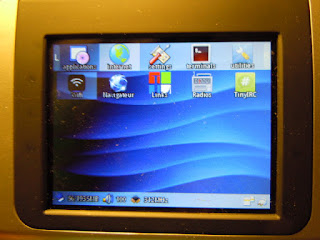 For starters, as seen above, dronz prefers tinyirc to pmirc because tinyirc keeps your keyboard input isolated on a separate line so you don't get mixed messages when someone else is posting at the same time. Ok, I can see where that might be helpful when composing a long line of text. But pmirc squishes down to only 2K on the jffs. At nearly 40K, tinyirc never seemed all that tiny to me. So I went to work. First I weaned it off ncurses and switched to ANSI escape sequences for the few simple screen drawing tricks. That got the executable down around 17K which is much closer to what I'd consider "tiny".
Once that was out of the way I figured I should probably take the time to zipitize it to make it more useable. First I fixed it to stop scrolling blank lines whenever it received a PING message. That was driving me nuts, slowly scrolling the real messages up and off the top of the tiny zipit screen. Then I added the home, end, pgup, pgdn, and arrow key support to complement the emacs style line editing keys and make composing messages easier on the zipit. I also added a -t command line switch to turn on message timestamps, and a ctrl-t key to toggle them on or off at runtime. Finally I added a splash of color; red for errors, magenta for JOIN messages, and green for my messages because all the cool IRC clients have color, even lowly pmirc.
Here you can see my colorful JOIN. And if you look real carefully, you can also see that I toggled timestamps on just before the JOIN. If the channel is quiet you can tell if timestamps are on by the uppercase Z after the TinyIRC release number on the status bar. A lowercase z means timestamps are off.
 I still need to edit the boot scripts to register an IRCNICK environment variable (maybe in ~/.bashrc). That way I won't keep getting a 30 second countdown to pick a new NICK whenever I startup tinyirc. Actually I need to edit all the scripts anyhow since they're currently all in french...
Here's the modified source and the smaller tinyirc executable: tinyirc.zip


Once that was out of the way I figured I should probably take the time to zipitize it to make it more useable. First I fixed it to stop scrolling blank lines whenever it received a PING message. That was driving me nuts, slowly scrolling the real messages up and off the top of the tiny zipit screen. Then I added the home, end, pgup, pgdn, and arrow key support to complement the emacs style line editing keys and make composing messages easier on the zipit. I also added a -t command line switch to turn on message timestamps, and a ctrl-t key to toggle them on or off at runtime. Finally I added a splash of color; red for errors, magenta for JOIN messages, and green for my messages because all the cool IRC clients have color, even lowly pmirc.
Here you can see my colorful JOIN. And if you look real carefully, you can also see that I toggled timestamps on just before the JOIN. If the channel is quiet you can tell if timestamps are on by the uppercase Z after the TinyIRC release number on the status bar. A lowercase z means timestamps are off.

Here's the modified source and the smaller tinyirc executable: tinyirc.zip
Subscribe to:
Posts (Atom)